

Custom manufacturing software for a paperless plant
The plant ran on paper and yesterday's numbers. Now four plants are on one screen, live.
MWAAF makes acoustic and heat shields for automotive OEMs in the United States, Canada and Mexico. Production reports were on paper, deviations were signed by whoever was around, and a safety risk had to find somebody to tell. Four custom applications replaced all of that.
- Industry
- Automotive supplier
- Use case
- Paperless manufacturing operations
- Technology
- Web, in the browser
MWAAF (Midwest Acoust-A-Fiber) makes acoustic and heat automotive shields for multiple OEMs in the United States, Canada and Mexico. Fyware co-designed the base of four custom applications and delivered the original deploy so the client's own team could keep growing the platform in-plant: a deviation authorization system, a defect heatmap, a production tracker and a safety risk tracker. All four replaced paper.
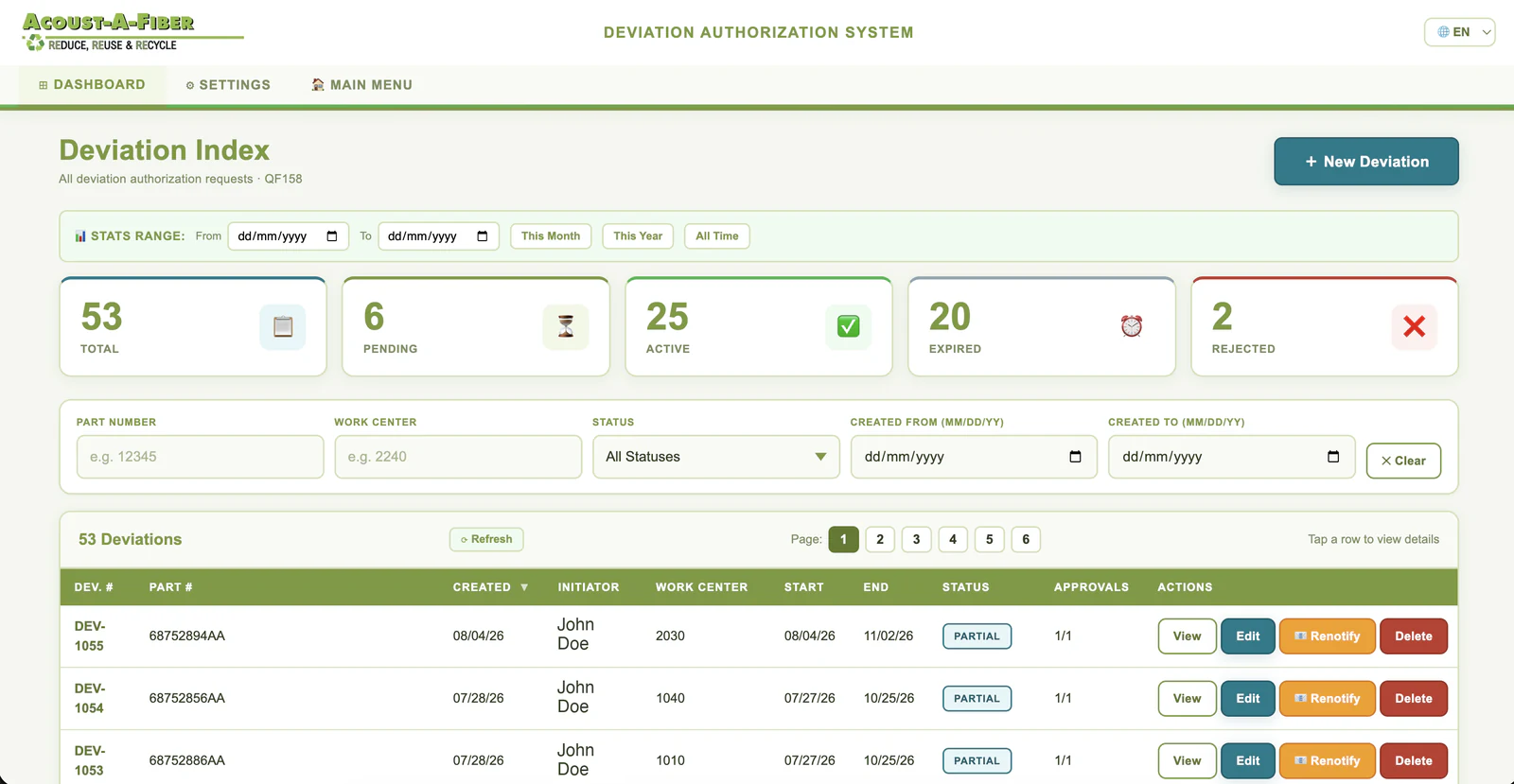
The figures, and where each comes from: the client reports more than $200,000 in documented cost savings from automation, process optimization and reduced administrative effort, stated in their own verified public review and counted across two manufacturing companies with multiple locations; four plants are visible in real time on a single board, with every work center showing its scrap rate and downtime by shift; and 53 deviation requests are under digital control, read from the system's own index, where before they were paper forms signed by whoever was around. The plant's own team continued to add applications after the first release.
What was built is custom manufacturing software for a paperless shop floor: the handful of processes that are specific to how this plant runs and that no ERP or MES ships with, connected to each other.
How it was decided
Paper does not tell you anything until tomorrow
The problem
Production was reported on paper. Data got lost, and what survived did not reach anyone until the following day, which meant nobody could react to a machine falling behind while there was still a shift left to fix it. Deviations were worse: they were signed by whoever was available and sometimes nobody found out they had been issued at all.
The call, which is theirs
MWAAF decided not to buy a suite. The processes that hurt were the ones specific to their plant, so they scoped custom applications one at a time, starting with the board the morning meeting runs on, and kept their own people close to the build.
What we built
Fyware co-designed the base and shipped the original deploy of the four applications, and set the client's team up to keep growing the platform from that base. That is exactly what happened: more applications were added after the first release.
The four applications
One board, and everything hangs off it
They are not four separate tools. From a work center on the live board you reach its deviations, its quality alerts, its bill of materials and its digital work instructions without leaving the screen.
Production Tracker
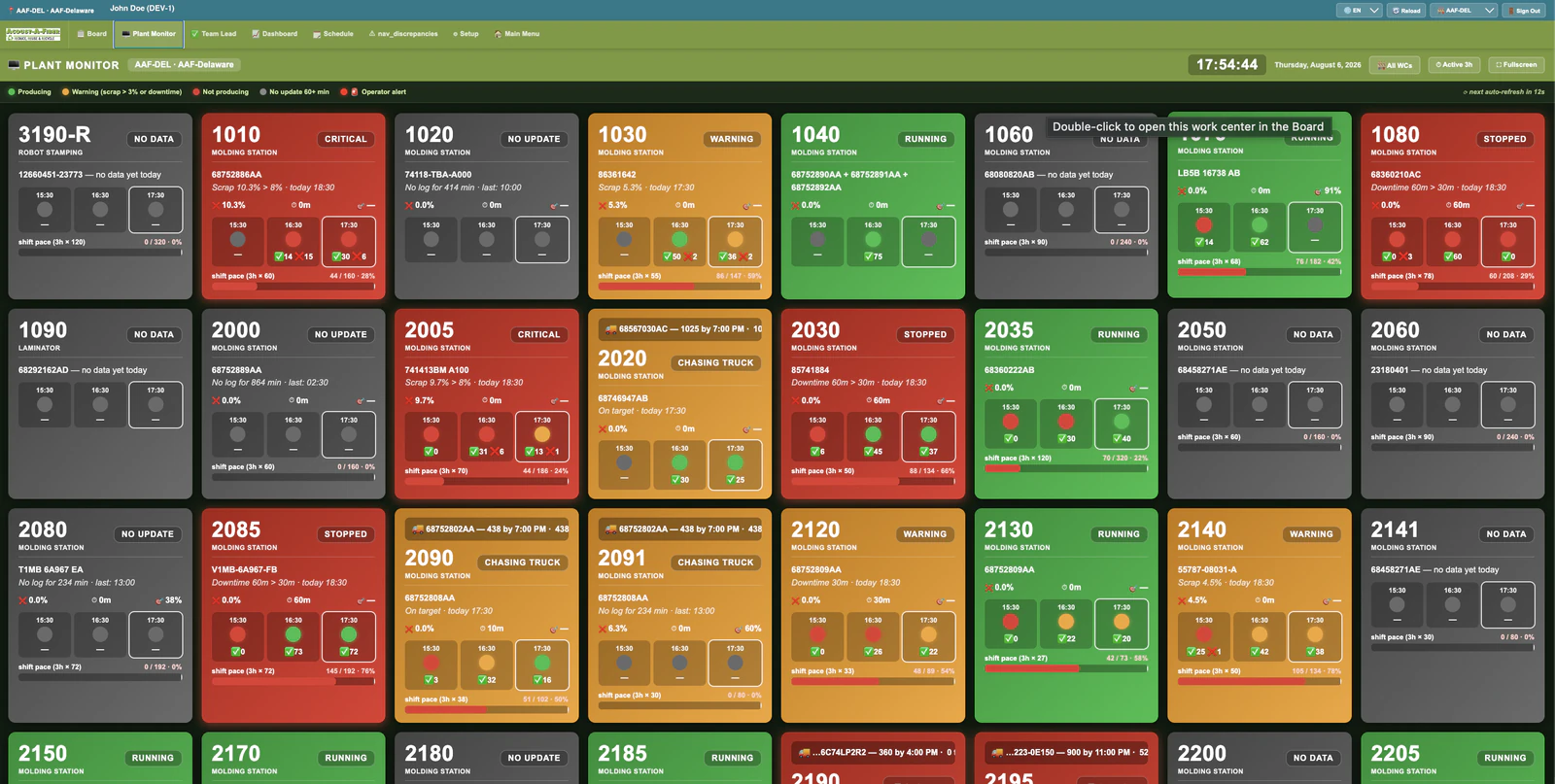
Real-time production monitoring across four plants, every machine grouped by line, refreshed on its own. Green is producing, amber is a scrap rate over target or downtime, red is stopped, grey is no update in the last hour. The pace bar compares what has been produced against what the shift needs.
Deviation Authorization System
Every deviation request in one index, by part number and work center, with its status and its approvals. Management approval is forced, distribution is automatic, and because it is digital the whole history can be analyzed. It replaced a paper form that was signed by whoever was around.
Defect Heatmap
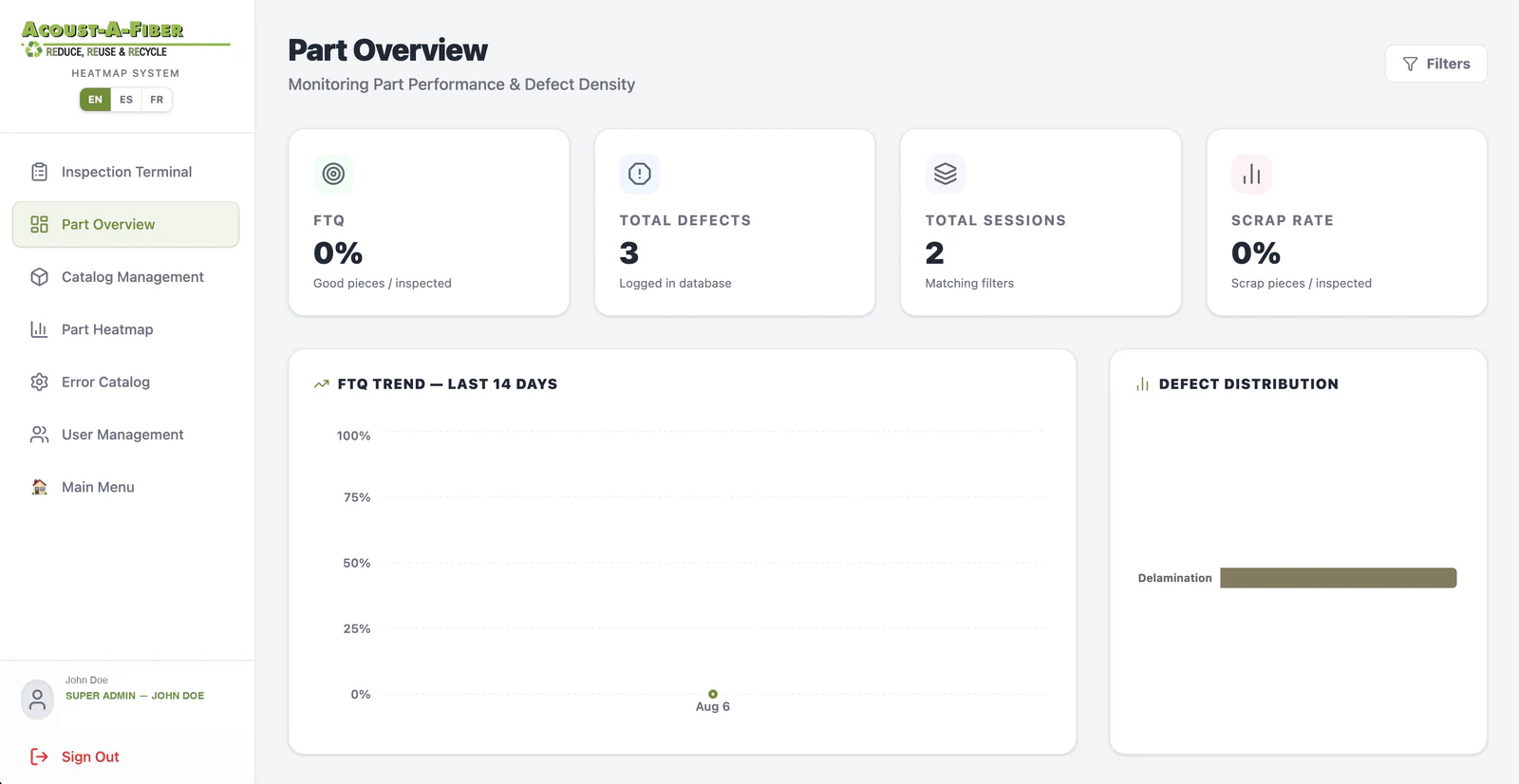
Maps where the defects actually land on the part. It earns its keep on the parts a customer has asked to be sorted, which is the expensive situation: instead of sorting blind, the plant can see the pattern and attack the root cause. MWAAF reports it helped considerably there.
On a normal line the cycle time is too fast to stop and mark a heatmap, so its use is deliberately narrow. That was the plant's own read, and a revision is already scoped.
Safety Tracker
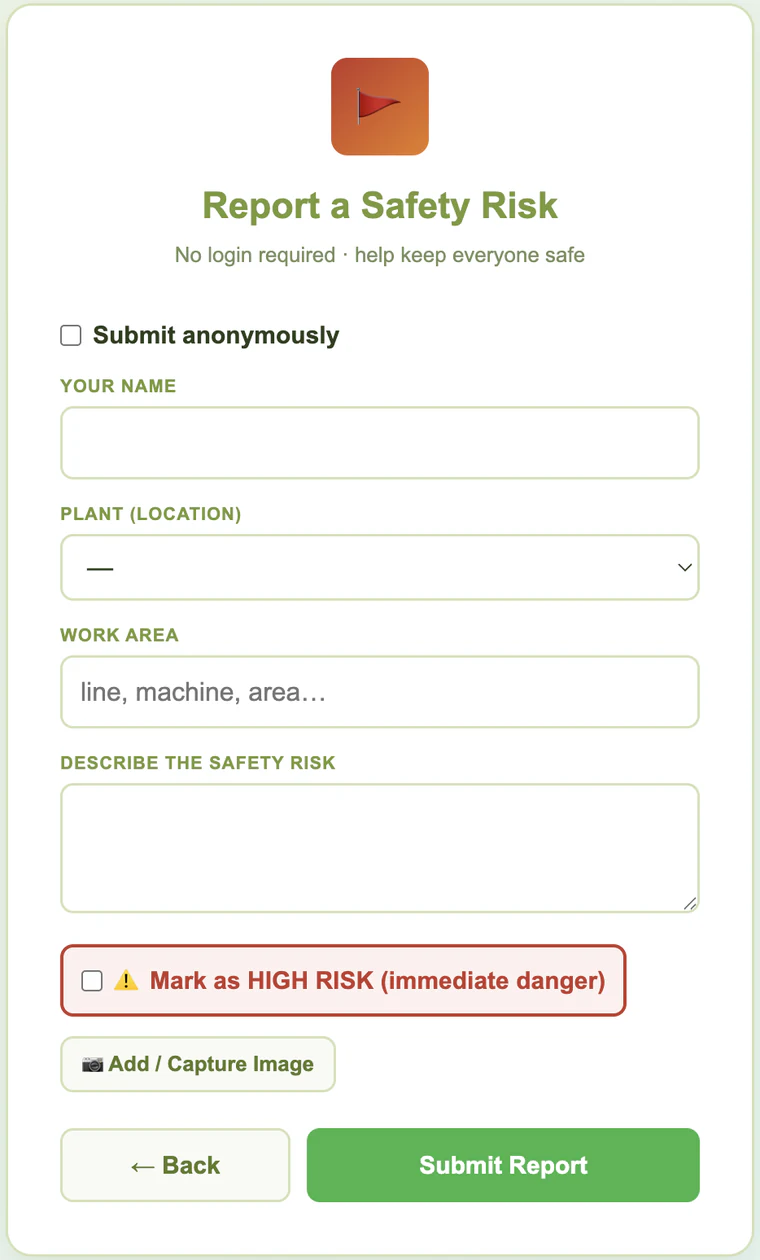
Scan the QR, no login, no account. Any operator or visitor can report a spill, a bare cable or a blocked aisle, optionally anonymously, and flag it as an immediate danger. It emails the safety lead, who has to close it or assign an action.
What the client reports
More than $200,000 in documented cost savings
In their own verified public review, the client describes the outcome as the “successful implementation of digital work instructions across two manufacturing companies with multiple locations” and process digitalization that “improved operational efficiency, standardized workflows, and delivered more than $200K in documented cost savings through automation, process optimization, and reduced administrative effort.”
That figure is the client's, and Fyware did not measure it. It is counted across two companies and covers more than this plant. We have not audited the breakdown, so it is quoted exactly as they wrote it.
The one that paid for itself first
A forklift that nearly hit several people, reported and acted on
Safety reporting used to depend on finding the right person and telling them. Now anyone in the plant scans a QR code and files it in under a minute, with a photo if they have one, anonymously if they prefer, and marked as an immediate danger if it cannot wait. It lands in the safety lead's inbox and cannot be quietly dropped: it has to be closed or assigned an action.
Shortly after it went in, a forklift that had nearly run over several people was reported through it. Management acted on the report and the operator was taken off the equipment. MWAAF states the system is helping them receive safety risk reports in time and prevent them, and that near miss is the example they give.
There is no accident-rate statistic on this page because there is not one yet: the tracker is early in its rollout. What is on this page is the incident the client reports it prevented.
What makes it work
Four decisions worth repeating
- Start where the argument already is. The first application was the board the morning meeting runs on, so it earned trust before anything else was asked of the floor.
- Nothing is an island. A work center on the board links to its deviations, its quality alerts, its bill of materials and its digital work instructions.
- Zero friction where it matters most. Safety reporting has no login, because a login is exactly the thing that stops somebody from reporting a spill.
- Build the base so the client can keep going. The original deploy was scoped so the plant's own team could add applications, and they did.
The processes, the quality standard and the decisions about how this plant runs belong to MWAAF. Fyware co-designed the base of the applications and delivered the original deploy so their team could keep growing the platform.
Is custom software worth it when you already have an ERP?
The honest answer is that it depends on how specific your pain is. An ERP is very good at the things every manufacturer does the same way. It is not good at the handful of processes that are peculiar to your plant, and those are usually the ones costing you money, because nobody sells a product for them.
This plant is a clear example. Very few systems handle deviations the way a plant that runs a lot of them needs, with forced approval and automatic distribution. And no general suite ships with the cost-reduction thermometer this client wanted. Custom software is the thin layer where your actual operation lives, on top of the ERP, which it does not replace.
The other half of the answer is how you scope it. Built as one enormous system, custom software is a risk. Built as one application at a time, on a shared base the client can extend, each one pays for itself before the next one starts, and the plant is not waiting on anybody to add the fifth.
“Fyware’s adaptability to support all industrial software application needs stood out.”

 Their own tracking platform
 Catalog in augmented reality
 Software and platformsThe full line