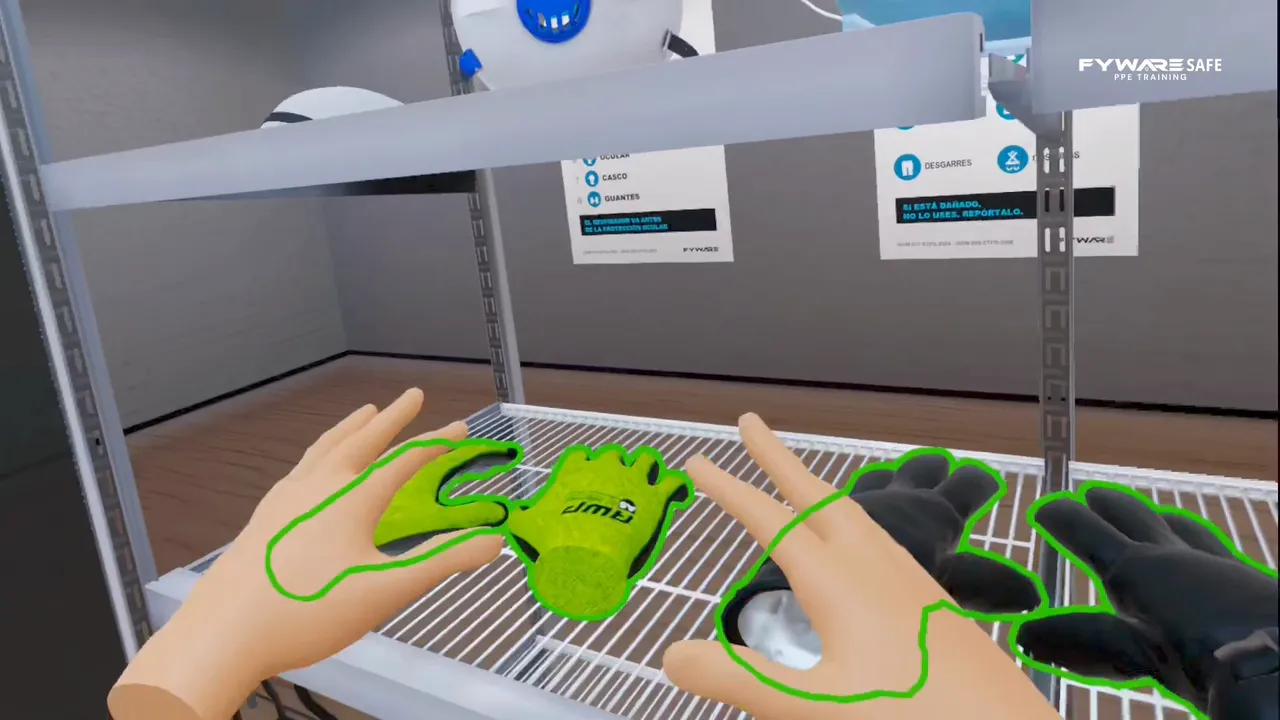
A cracked helmet on the shelf. Do they reject it or put it on?
The worker walks into a room with gear from their own industry, from other industries, damaged and improvised, and picks with their own hands what their job calls for. If they get it wrong, they hear it in the moment.
It is one of the four Fyware Safe simulators and it is aligned with OSHA 29 CFR 1910.132(f). It is practice before the demonstration the standard requires, which the worker does with their own PPE.
OSHA requires the employer to assess the workplace, select the protective equipment it calls for and train each worker to use it, and it requires the worker to demonstrate that they can use it before doing the job. Here they practice choosing it and putting it on with their own hands, without controllers, before doing it with their own gear.
Aligned with OSHA 29 CFR 1910.132(f)
2 minPer run, from 90 seconds to two and a half minutes. It restarts immediately
8Industries in the same build, from manufacturing to mining
2 × 2 mOf clear floor. Standing, no walking around and no controllers
15-20People per hour in continuous rotation, on a single headset
The mechanics
You are allowed to fail, and that is the exercise
The room holds equipment from their own industry, from other industries, damaged and improvised. The exercise highlights the group in play, never the correct item.
1
Good gear and bad gear together
Cracked helmets and torn gloves next to the correct equipment. Under OSHA, damaged PPE must not be used, so checking it before use is part of the job.
2
The group lights up, not the item
When it is time for the head, every helmet lights up. Which one is theirs is still their call.
3
With their hands, no controllers
Hand tracking: pick up each item and put it where it goes, body, face, then hands.
4
They get it wrong and hear it
The mistake is corrected out loud, right then.
5
Eight industries in the same build
From manufacturing to mining, through healthcare, welding, energy, agribusiness, logistics and construction.
6
With your company's own PPE
Your logo, your colors and your equipment list per role. It was built for that.
A signed receipt, a talk or a simulator
The signature proves the gear was handed out. It does not prove the person knows which gear is theirs or that they would reject a damaged item.
How PPE training is done today
Hand-out with a signed receipt
Toolbox talk or video
PPE simulator
What the person does
Receives the gear and signs
Listens and looks at a slide
Picks and puts on each item with their hands
Can they get it wrong
No
No
Yes, and they hear it in the moment
Damaged or wrong-industry gear
Not present
Mentioned
In the room, next to the right gear
How long
A few minutes
As long as the talk
From 90 seconds to two and a half minutes
What is left at the end
The signature
An attendance sheet
The result, shown in the headset
The standard behind this risk
OSHA requires the employer to assess the workplace, select the protective equipment it calls for and train each worker to use it, and it requires the worker to demonstrate that they can use it before doing the job.
The PPE standard, by market
Market
Standard
United States
PPE · OSHA 29 CFR 1910.132
Mexico
EPP · NOM-017-STPS-2024
Brazil
EPI · NR-6
European Union
EPI · Directive 89/656/EEC
Germany
PSA · PSA-BV and ArbSchG
Japan
保護具 · 労働安全衛生法
The simulator adds hands-on practice before workers use their own gear; the 1910.132(f)(2) demonstration and your training records stay with you.
For the daily reminder there is the PPE toolbox talk: what to check before the shift, three questions for the crew and a PDF with a sign-in sheet.
On your side
What it takes to run it at your plant
The simulator runs inside the headset and needs no network: there is nothing to install, and IT does not have to get involved.
15-20
How many per hour
People per hour on a single headset, in continuous rotation. Each run takes from 90 seconds to two and a half minutes.
2 × 2 m
How much space
Standing, no walking around and no controllers: the headset tracks the hands. A clear room of 2 by 2 meters is enough.
8
Which industries
Manufacturing, mining, healthcare, welding, energy, agribusiness, logistics and construction in the same build, and with your company's own gear if you ask for it.
How to get it
Three ways to have it at your plant
The same simulator, depending on what you need: own it, pilot it or bring it to an event.
Buy
For your training program
The module is installed on your Meta Quest 3 headsets, or on the ones we include, and it stays at your plant. It is loaded with your equipment list per role, your logo and your colors. Priced to the scope of your operation: ask for the range.
Rent
For a pilot or a short event (Mexico)
Headsets with the simulator loaded for the days you need them. Headset rental in Mexico runs from $2,500 to $3,500 MXN plus VAT per headset per day: VR equipment rental.
Event
As a station at your Safety Week
It is one of the five experiences in the activation, with Fyware technicians on site. From $3,800 USD before tax: Safety Week activities.
Quoted separately, on the same engine: additional industries, an integrated test and a results export. If you need formal evidence, we plan for it from the start.
PPE training simulator FAQ
How do I determine the PPE each role needs and train people to use it?
OSHA 29 CFR 1910.132 requires the employer to assess the workplace, select the protective equipment the hazards call for and train each worker on it, and 1910.132(f)(2) requires the worker to demonstrate the ability to use it before doing the work. The simulator starts from the equipment list your company has already defined per role and puts the worker in a room that also holds gear from other industries, damaged and improvised. The group in play lights up, every helmet for instance, but never the correct item: the call is theirs, they can get it wrong and they hear it in the moment. The build ships with eight industries and is personalized with your logo and your colors.
Is a signed PPE receipt enough as training?
No: it proves you handed the gear out. OSHA requires the worker to be trained and to demonstrate that they can use the equipment properly before doing the job, and the employer to certify that training in writing. The simulator adds hands-on practice before that demonstration, which the worker does with their own gear.
Can you load our company's PPE?
Yes, it is built for that: your equipment list per role is loaded, with your colors and your logo.
More questions
How long does it take and how many people per hour?
Each run takes from 90 seconds to two and a half minutes and restarts right away. A single headset handles 15 to 20 people per hour in continuous rotation.
Does it need controllers or special space?
No. The person uses their own hands, no controllers, and works standing without walking around. A clear room of 2 by 2 meters and a Meta Quest 3 headset are enough, with no internet and no accounts.
Can I bring it to our Safety Week?
Yes. The PPE simulator is one of the five experiences in the Fyware Safety Week activation: two stations, a technician at each, and about 20 people per hour.
Tell us what you want to solve in your plant. Fyware designs extended reality around the equipment and constraints of your operation, and builds it to grow from a pilot to the whole site.
Tom Klukowski, Fyware Partner · Valcre Marketing We reply in under 24 business hours, with scope, timeline and investment range.
In the meeting you see the simulator running and what it would take to bring it to your plant, with scenarios adapted to your layout. And if you need to sell it internally, this page is your presentation: share it with your team.