We built it after seeing the same pattern over more than nine years of VR training.
Why it exists
Companies cut back on VR training over time, and the reason was always the same: the instructor could not see what happened inside the headset, so they could not guide, evaluate, or prove the session had worked. We built Fyware Hub so a single instructor can supervise and evaluate every trainee in real time from a tablet.
What it runs on
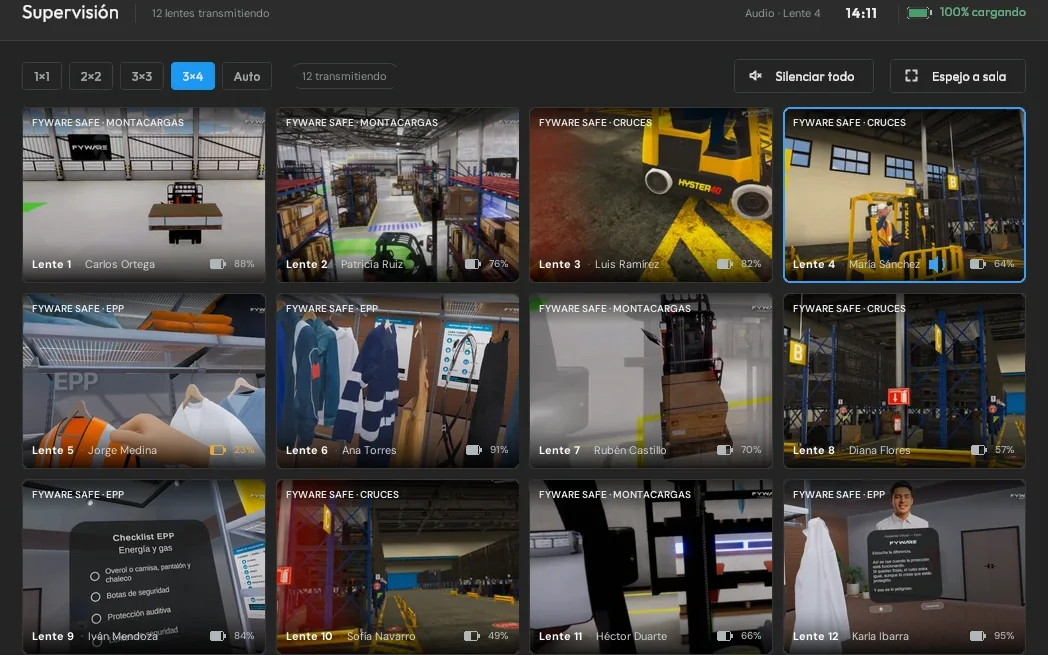
One Android tablet supervises up to 12 headsets live, and for more headsets you add another tablet on the same network. Everything runs on a dedicated local network that needs no internet or cloud, and the session needs no capture cards or cables.
Sound familiar?
The four pains we hear most often in group VR sessions.
All three work with two or three headsets. They split apart once the room fills up.
One facilitator per headset
Casting to a screen
Fyware Hub
What the instructor sees
The headset in front of them
One headset per screen
Up to 12 headsets on one tablet
If the network drops
Not affected
The stream cuts out
Reconnects on its own; the result waits on the headset
New simulator version
Laptop and cable, headset by headset
Laptop and cable, headset by headset
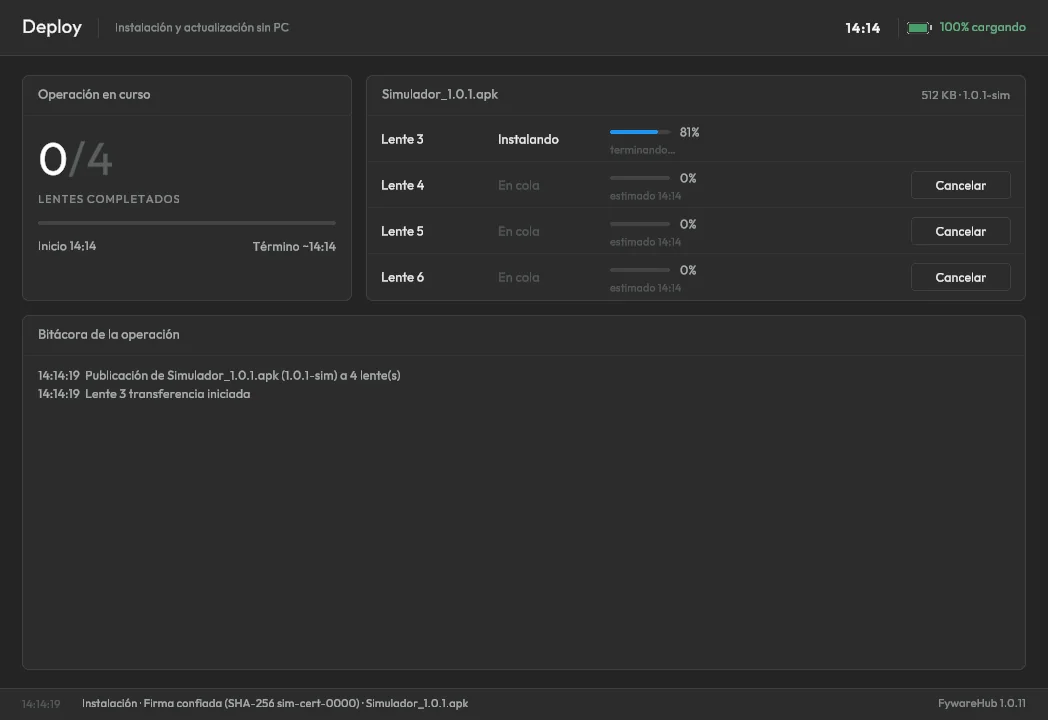
Published from the tablet to the whole fleet
Evidence left behind
Whatever they managed to write down
None
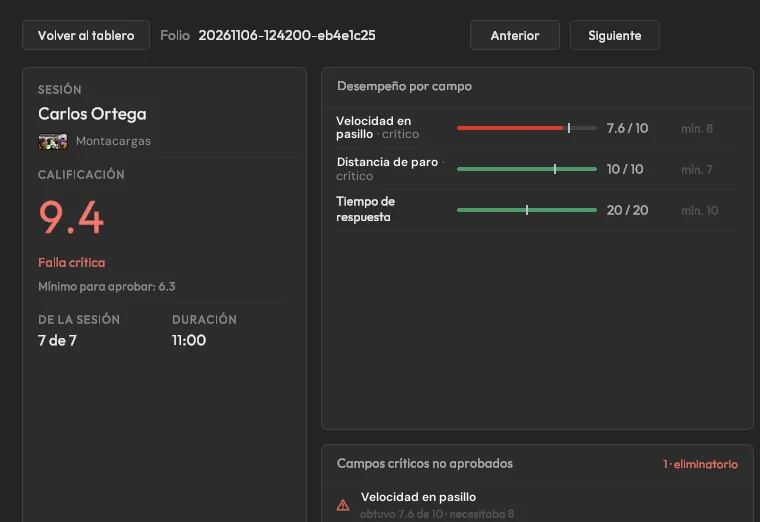
Field-by-field score for every attempt
12
Live headsets per tablet. For more, another tablet on the same network
100%
Offline operation. Zero internet dependency
0
Capture cards, dongles, or cables during the session
The answer
The whole room, on one tablet
Fyware Hub puts the live video from every headset and the result of every attempt on an Android tablet, and the same tablet updates the app across the whole fleet. The session stops depending on how many instructors are in the room.
Blind sessions, no view of what each participant experiences
One facilitator for every active headset
Dependency on internet or the corporate network
No record of who passed or what failed
With Fyware
Up to 12 headsets live on one tablet
One instructor guides and evaluates the whole room
100% offline: works on a plant floor, mine, or remote site
Field-by-field score for every attempt, exportable to CSV
Companies already seeing these benefits
The cost of waiting
Without session visibility, VR training becomes a black box.
An instructor cannot guide or evaluate what they cannot see, and that caps them at a handful of headsets at a time.
No vague promises: these are the line items where our clients get the money back.
01
Fewer instructors per session
One instructor supervises up to 12 headsets from a tablet and evaluates every trainee.
02
100% offline operation
It does not depend on plant internet or the cloud, so it works where connectivity is restricted.
03
Real-time correction
See what each trainee sees and fix the mistake the moment it happens.
04
The fleet up to date without a laptop
A new simulator version reaches every headset from the tablet, without going headset by headset with a cable.
WHAT IT TAKES
What it takes on your side, before you sign anything
To test a full session, the tablet and a dedicated router are enough, along with headsets running your simulator.
01
How long
Pairing a headset takes as long as typing six digits. Publishing a 545 MB version takes about 42 seconds per headset over the local network, and a headset that restarted reconnects in seconds with a cable to the tablet.
02
Who on your team
One instructor runs the room from the tablet. IT approves the dedicated network and its ports once, and the admin PIN stays with whoever publishes versions and exports results.
03
What you walk away with
The room running your simulator, with the fleet updated from the tablet. The results of every attempt come out in a CSV that opens in Excel.
Times are Fyware measurements on an Android tablet and Meta Quest 3. What gets scored in each attempt is defined when your simulator is developed.
What your IT team will ask
The answers that usually take weeks of security questionnaires, upfront:
Nothing leaves your network
Everything runs on a dedicated local network, and no component contains code that reaches the internet. The tablet does not scan the network for headsets: it only accepts the ones paired with their code.
One key per headset
Each headset gets its own 256-bit key when it pairs, with a six-digit code the operator approves. Video, audio, and results travel encrypted with AES-256 and authenticated with HMAC-SHA256, and a headset can be revoked from the tablet.
Controlled access and deployment
Deploy and Results require the admin PIN, the session locks itself after inactivity, and the tablet can run in kiosk mode. Deploy only installs packages with the signature you confirmed, and never an older version.
We designed Fyware Hub's security framework in alignment with OWASP, NIST SP 800-53, IEC 62443, and ISO/IEC 27001. Controls SEC-01 through SEC-07 are mandatory for every corporate deployment and are validated by IT before project acceptance.
Security controls
SEC-01
Device key authentication
SEC-02
Persistent status indicators
SEC-03
Confirmation of critical actions
SEC-04
Deployment audit log
SEC-05
Admin PIN access control
SEC-06
Network isolation and port control
SEC-07
Per-device authenticated encryption
Technical specifications
Platform
Android 10+ tablet (station) · Unity-compatible headsets; production reference: Meta Quest 3
Capacity
Up to 12 live headsets per tablet in a 3×4 grid; for more headsets, another tablet on the same network
Network
5 GHz Wi-Fi 5 or 6 with a dedicated router, 100% local, no internet or cloud
Encryption
AES-256 with HMAC-SHA256, a key per headset, and replay protection
Technologies
Unity (C#) · TCP/IP · motion-JPEG
Compliance frameworks
Aligned with
ISO/IEC 27001 · NIST SP 800-53 · IEC 62443 · OWASP Top 10 · Ley Federal de Protección de Datos (México)
Ask us for the technical and security documentation your IT team needs; we will answer the questionnaire with you.
Why there is no comparable
As far as we have been able to compare across platforms from Mexico, Latin America, Spain and the US, none combines these three at once:
✓ Live supervision of up to 12 headsets on one tablet, with the trainee's audio
✓ Fully offline operation, no cloud and no dependence on plant wifi
✓ Field-by-field scoring of every attempt and fleet updates from the same tablet
Finalist at the 2026 Auggie Awards (AWE USA), Best Enterprise Solution category.
How do I know whether my people actually learned anything in VR training?
Because every attempt reaches the tablet already scored. The simulator reports the score for each evaluated field, and Fyware Hub calculates the score out of 10, flags the critical fields that fell below their minimum, and stores who did it, when, and on which headset. During the session the instructor sees live what each person is doing and steps in when someone gets stuck. Everything runs offline, so the record does not depend on the plant network.
Does my operation's data ever leave the plant?
No. Fyware Hub runs 100% cloud-free: video is watched live on the tablet and results are stored on it, behind the admin PIN. They only leave the plant if someone exports them to CSV. The details of how we handle data and intellectual property are on security and data ownership.
More questions
What is Fyware Hub?
It is the platform that lets a single instructor supervise, guide, and evaluate every participant in a VR session in real time (each one in a different simulator and headset) from an Android tablet. It includes Fyware Deploy to update the app on the headsets. It was born from 9+ years deploying extended reality training: the technology was being abandoned because instructors could not see what happened inside the headset.
How many headsets does it support and what equipment do I need?
One Android tablet supervises up to 12 headsets live, in a 3×4 grid. For more headsets, add another tablet on the same network. You need the tablet (we recommend a Snapdragon 865 or better and 8 GB of RAM), a dedicated 5 GHz Wi-Fi router, and Unity-compatible headsets; the production reference is the Meta Quest 3. The session needs no capture cards or cables.
Does Fyware Hub work without internet?
Yes: it runs 100% offline, with no cloud and no internet dependency, built for plants and sites where connectivity is limited or restricted for security.
How do you update the app on the headsets?
With Fyware Deploy, which comes inside Hub. Load the new version from a USB drive or the tablet's downloads folder, confirm its signature the first time, and publish it to the headsets you choose. The tablet installs one at a time, checks the version that ended up installed, and keeps a log; a 545 MB package takes about 42 seconds per headset over the local network. If a headset restarts, its link comes back by plugging it into the tablet for a few seconds with an OTG adapter.
What gets scored in each attempt?
Whatever is defined when your simulator is developed: each evaluated field carries a score, a passing minimum, and whether it is critical. The tablet calculates the score out of 10 with the same rule for every simulator and flags a critical failure when a critical field falls below its minimum, even if the overall score is high. Results can be filtered by period, simulator, and outcome, and exported to CSV with one row per field.
Let's talk about your training program
Talk to us about integrating real-time extended reality supervision into your training program.
Tom Klukowski, Fyware Partner · Valcre Marketing We reply in under 24 business hours, with scope, timeline and investment range.
In the meeting we show you Hub live with multiple headsets and how it would run at your site. And if you need to sell it internally, this page is your presentation: share it with your team.